
SharePoint publishing sites, classic user-created pages, and custom scripting in SharePoint Online
Microsoft has announced upcoming changes to classic SharePoint experiences, including classic publishing sites, classic pages, and custom scripting in SharePoint Online.
What's changing?
Beginning 1 March 2027, Microsoft will disable the creation of new classic publishing sites and the activation of publishing features in existing tenants.
Beginning 1 October 2028, existing classic user-created pages will become read-only, and custom scripting enforcement will be extended across all tenants.
Affected page types include:
• Wiki pages
• Web Part pages
• Blog pages
• Publishing pages
• Custom ASPX pages created using SharePoint Designer or third-party solutions
Importantly, Microsoft has stated that existing content will remain available for viewing. The change affects the ability to create, modify, or continue relying on these legacy experiences.
What does it mean for your organisation?
For organisations already using modern SharePoint, there may be little or no impact. However, organisations with older intranets, publishing portals, or custom SharePoint solutions should begin assessing their environment and identifying any dependencies on:
• Classic publishing features
• SharePoint Designer customisations
• Custom scripting
• Legacy page types
Our recommendation
While the final enforcement dates are still some time away, this announcement provides a clear signal that now is the time to plan for modernisation rather than waiting for the deadlines to approach.
A proactive assessment can help identify risks, prioritise remediation activities, and develop a roadmap for moving to modern SharePoint experiences while avoiding future disruption.
If you're unsure whether your SharePoint environment contains classic sites, pages, or custom scripting dependencies, now is a good opportunity to review your platform and understand any potential impact.
Passkey Support for B2B Users in Microsoft Entra ID
Microsoft is extending passkey support to B2B users, including guest users and external collaborators, providing a more secure and phishing-resistant authentication experience for external access scenarios.
What's changing?
Today, passkeys are supported for member users within their home tenant. With this update, eligible B2B users will be able to register and use passkeys issued by the resource tenant to satisfy that tenant's MFA requirements. This addresses a long-standing challenge where external users could not use a resource tenant passkey when MFA was required and the resource tenant did not trust MFA performed by the user's home tenant.
Once rolled out, eligible users will be able to register passkeys through:
• The resource tenant's My Security Info page
• Existing proof-up authentication prompts
• Passkey registration campaigns
Why this matters
This enhancement provides several benefits for organisations that use Microsoft Entra B2B collaboration:
• Stronger phishing-resistant authentication for guest and external users
• Improved user experience when accessing resources across tenant boundaries
• Better alignment with Microsoft's passwordless authentication strategy
• More consistent application of MFA requirements for internal and external identities
What should organisations review?
While no immediate action is required, Microsoft recommends reviewing:
• Authentication Methods policies and passkey configurations
• Conditional Access requirements for B2B users
• Passkey registration campaigns and user targeting
• Legacy MFA settings, particularly where SMS or voice authentication is still enabled
It's also worth noting that this change intersects with Microsoft's planned retirement of SMS and voice authentication methods. Organisations should ensure they understand how existing authentication policies may automatically enable passkey registration for eligible users.
Recommended next steps
We recommend that organisations using Microsoft Entra B2B collaboration assess their current authentication policies and external user access requirements ahead of rollout. This will help ensure that passkey adoption, MFA requirements, and Conditional Access policies continue to operate as intended for partner, supplier, contractor, and guest access scenarios.
For organisations pursuing passwordless authentication and stronger identity security controls, this is a positive step toward extending modern authentication capabilities beyond internal users to the wider collaboration ecosystem.
New SAM Report
For years, one of the challenges with SharePoint governance has been understanding the true impact of permissions granted through "Everyone" and "Everyone except external users".
You could identify sites where these groups were used, but determining exactly which files and documents were exposed often required significant investigation.
Microsoft is addressing this with a new report in the SharePoint Admin Centre that provides item-level visibility into content shared through these special groups. Administrators will be able to identify the specific files and items accessible through broad permissions across both SharePoint and OneDrive.
What makes this interesting isn't just the report itself.
As organisations prepare for AI, Copilot, and broader information discovery capabilities, understanding what content is widely accessible becomes increasingly important. You can't effectively govern information if you don't know what's exposed.
This enhancement helps move governance conversations from:
Which sites might be overshared? to Which specific files are accessible to everyone?
For organisations undertaking access reviews, permissions remediation, or Copilot readiness assessments, this feels like one of those practical improvements that could save a lot of time and provide much clearer visibility into information exposure.
Teams Recording Consent
Microsoft is introducing the ability for organisations to require participants to acknowledge custom terms before joining a Teams meeting.
That could include:
• Recording notifications
• Responsible AI usage notices
• Compliance and regulatory disclaimers
• Organisation-specific terms and conditions
What's particularly interesting is that these acknowledgements will be recorded in audit logs, providing an audit trail that can support governance, investigations, and compliance processes.
From an information governance perspective, this is one of those features that solves a long-standing challenge. Many organisations need participants to acknowledge specific conditions before a meeting starts, especially where meetings are recorded, sensitive information is discussed, or AI-powered features are being used.
Rather than relying on verbal announcements or text buried in meeting invitations, organisations will be able to make acknowledgement a required step before joining.
As AI, compliance, and regulatory requirements continue to intersect with collaboration platforms, we can expect to see more controls like this becoming part of the standard Teams experience.
It's a small change on the surface, but potentially a valuable one for regulated industries and organisations with strong governance requirements.
New Hero Link sharing experience coming to OneDrive and SharePoint
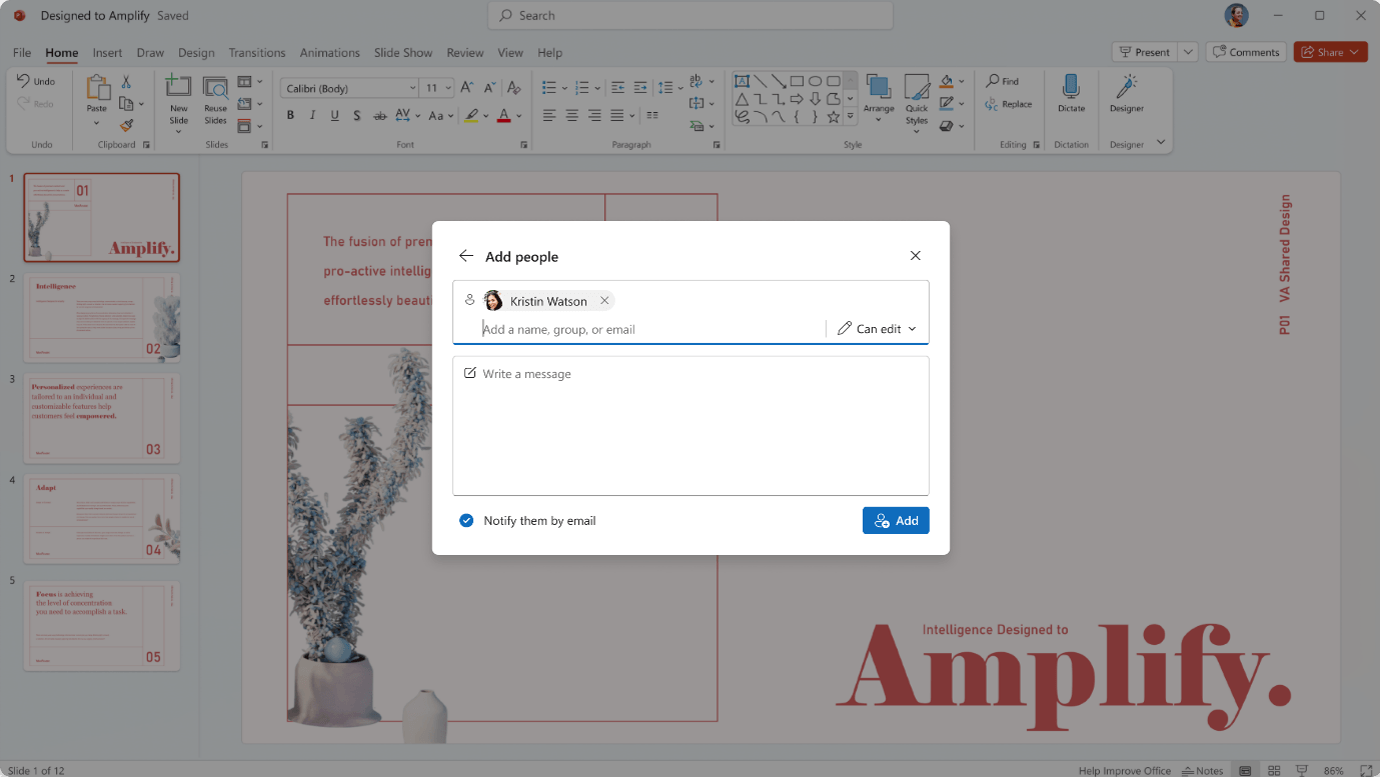
Microsoft is rolling out its new third-generation sharing experience across SharePoint and OneDrive, introducing a Hero Link model designed to simplify how users share and manage access to files and folders.
What's changing?
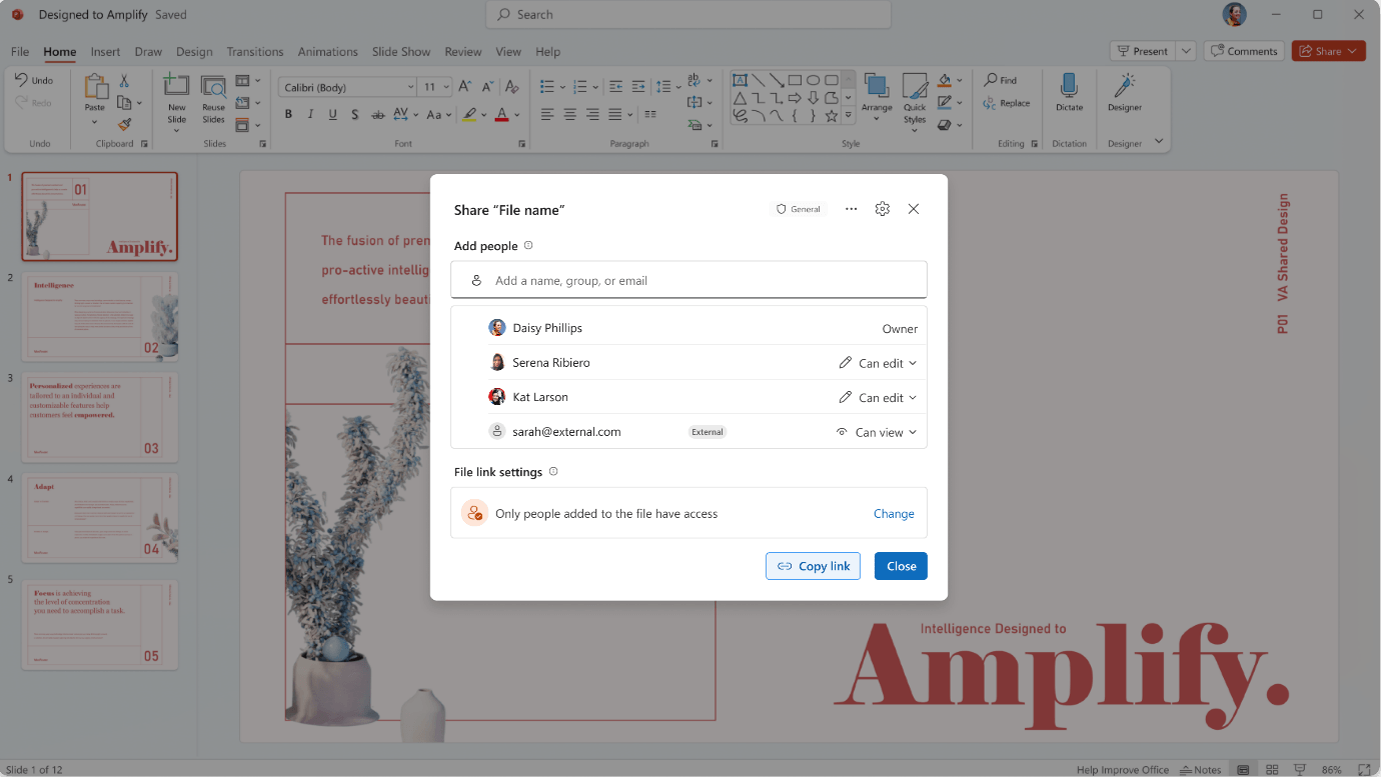
The Hero Link becomes the primary sharing link for every file and folder.
Rather than creating multiple different sharing links over time, users will work with a single link that can be updated as access requirements change.
Key benefits include:
• A consistent experience whether users select Share, Copy Link, or use the browser URL.
• A single primary sharing link for each file and folder.
• The ability to modify access on an existing link instead of creating and distributing a new one.
• Reduced confusion around multiple links being created for the same content.
• Existing sharing links will continue to work and will be available under Other links.
Default behaviour
By default, Hero Links will be set to Only people added to the file. This means the link itself does not automatically grant access to anyone beyond those who have been explicitly permissioned.
Where organisational policies allow, users can still broaden access to:
• People in the organisation with the link.
• Anyone with the link (if external sharing policies permit).
Why this matters
This is one of the more significant changes to Microsoft 365 sharing behaviour in recent years.
The new model simplifies file sharing for end users while making access management more intuitive. For example, if a recipient cannot access a file that has already been shared, the sender can update permissions on the existing Hero Link rather than creating and sending a replacement URL.
For organisations focused on collaboration, governance, and external sharing, the change should reduce complexity and make sharing behaviour easier for users to understand.
Rollout
This feature was originally expected earlier in the year but experienced several delays. Microsoft has now confirmed rollout will begin in early October 2026 and continue through the end of November 2026.
Recommendations
We recommend organisations:
• Review user guidance relating to file sharing.
• Update training and support documentation to reflect the new Hero Link model.
• Communicate the change to users who frequently collaborate internally or externally.
• Review site-level sharing settings where different sharing behaviours are required.
• This is likely to be a noticeable change for many Microsoft 365 users, particularly those who regularly share content from SharePoint and OneDrive.
Teams Recap App
Microsoft has packed a lot of AI-powered meeting capabilities into Teams over the last year. Recordings, transcripts, summaries, action items, audio recaps and video recaps are all becoming part of the meeting experience. The challenge is often finding everything again when you need it.
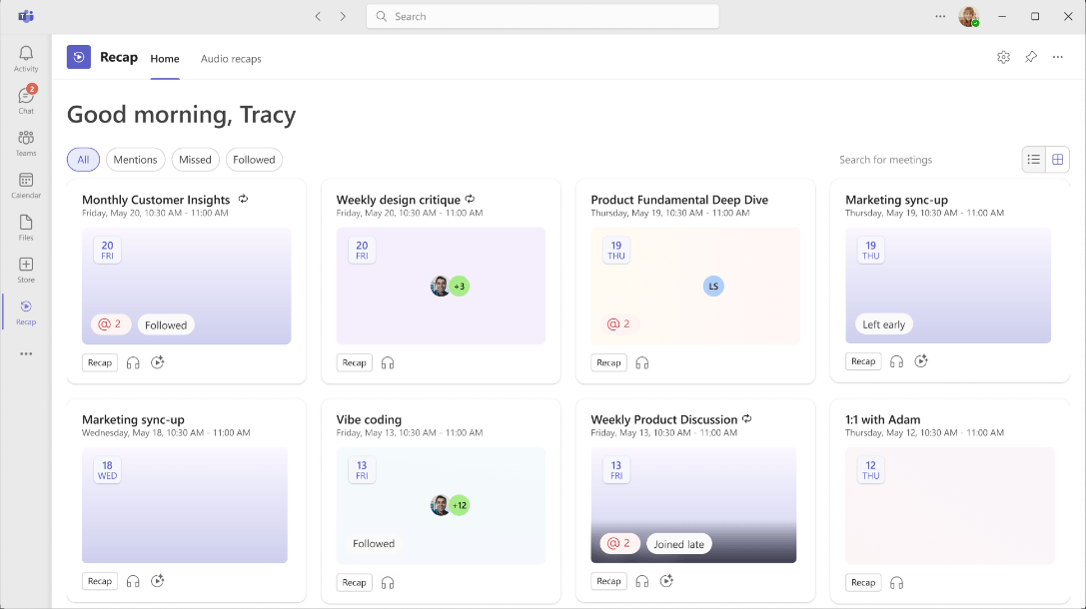
The new Meeting Recaps app brings recordings, transcripts, AI-generated summaries and meeting artefacts together into a single experience, making it much easier to revisit decisions and discussions.
The information management impact is significant.
For years, meeting knowledge has been scattered across recordings, notes, chats, emails and people's memories. We're now seeing Microsoft create a much more structured way to surface that information after the meeting.
The opportunity is obvious: less searching, better continuity, and easier access to organisational knowledge.
The challenge is equally important: users need to understand that the recap is a view over underlying content, not a replacement for good governance and information management practices. This aligns with existing guidance that governance and retention apply to the underlying meeting artefacts rather than the recap experience itself.
Technology can make information easier to find. It doesn't remove the need to manage it well.
SharePoint Flexible Sections
One of the ongoing challenges with SharePoint page authoring is finding the right balance between consistency and creativity.
Microsoft's recent improvements to Flexible Sections aim to make that balance a little easier to achieve. Flexible Sections allow authors to move and resize web parts within a page section, rather than being constrained by traditional column layouts. The latest update focuses on making the experience easier to use, more predictable, and faster to author, while adding guidance and controls to help maintain consistent page design.
While it may seem like a small enhancement, it addresses a common challenge for intranet and communication site owners: giving authors enough flexibility to create engaging content without ending up within consistent page layouts across the organisation.
These are the types of improvements that often have the biggest impact. Not because they're revolutionary, but because they make it easier for authors to create better content with less effort.
SharePoint Button Web Part Updates
Microsoft has expanded the SharePoint Button web part so it can now do more than simply link to a page or website.
Buttons can now:
• Launch a predefined prompt in Copilot for SharePoint (for users with Microsoft 365 Copilot licensing)
• Trigger a Power Automate flow directly from a SharePoint page
One of the more interesting aspects of this update is that it brings AI and automation closer to where people are already working. Rather than asking users to remember prompts, find a flow, or navigate to another application, organisations can embed these experiences directly into business processes and intranet pages.
This is another example of Microsoft shifting SharePoint from being primarily a content repository to becoming a front door for AI-assisted work and business processes.
Microsoft Edge Now Adheres to Screen Capture Restrictions for Sensitivity Labels
Microsoft is closing a gap where PDFs viewed in OneDrive and SharePoint through the browser did not enforce the Do Not Allow Screen Capture control. With this update, users accessing sensitivity-labelled PDFs through Microsoft Edge will have the same screen capture restrictions applied in the web experience as they do in desktop applications.
Why it matters:
• Improves protection of highly sensitive documents
• Provides more consistent behaviour across desktop and browser experiences
• Reduces the risk of accidental capture and sharing of sensitive content
• Strengthens the value of sensitivity labels as a data protection control
It's also a useful reminder that data protection controls are designed to reduce risk, not eliminate it. Determined users can still find ways to capture information, whether through another device, photographs, manual transcription, or other workarounds.
That's why effective information protection has always been a combination of technology, governance, education, and organisational culture. Technical controls raise the barrier and discourage inappropriate behaviour, but they don't replace the need for users to understand and respect their responsibilities when handling sensitive information.
Exclude Sync for Specific Folders
Microsoft has introduced the ability for organisations to exclude specific folders from syncing to OneDrive, allowing device-specific or development-related folders such as PowerShell modules, Visual Studio configuration folders, and node_modules to remain local rather than automatically synchronising to the cloud.
Why it matters:
• Reduces unnecessary consumption of OneDrive storage
• Prevents local machine configuration files from being synced and potentially shared across devices
• Improves the experience for developers and power users who work with large temporary or generated folders
• Gives administrators more granular control over what content should and shouldn't be synchronised
From a governance perspective, this is also a good reminder that not everything belongs in the cloud. While we've spent years encouraging users to move content into managed platforms, there are still categories of machine-generated, temporary, and device-specific content that add little business value when synchronised.
This enhancement gives organisations another tool to improve the signal-to-noise ratio in OneDrive while reducing storage consumption and sync overhead. A practical improvement, but one many IT teams and developers are likely to appreciate.