
CUSTOMER UPDATE
Your files now tell you what they are
OneDrive Manager with AI autoclassification is a free upgrade
for every existing customer. Same interface. Now understands
your content.
Upgrade Now
Every unclassified file is a risk you can't answer for. An OIA or LGOIMA request you can't fill fast enough, a Copilot rollout you're not sure of, a retention policy nobody's applied. AI autoclassification fixes it at a scale manual review never could.

Same interface. Smarter decisions.
OneDrive Manager has always given you visibility across every OneDrive in your organisation. From this release, it also tells you what those files actually are.
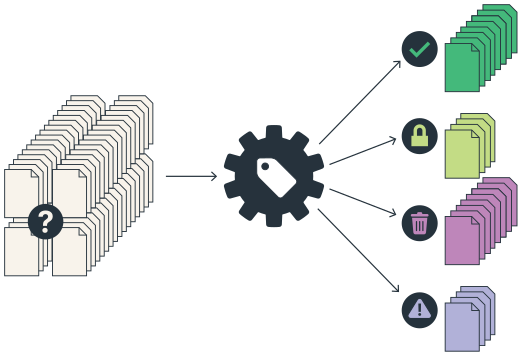
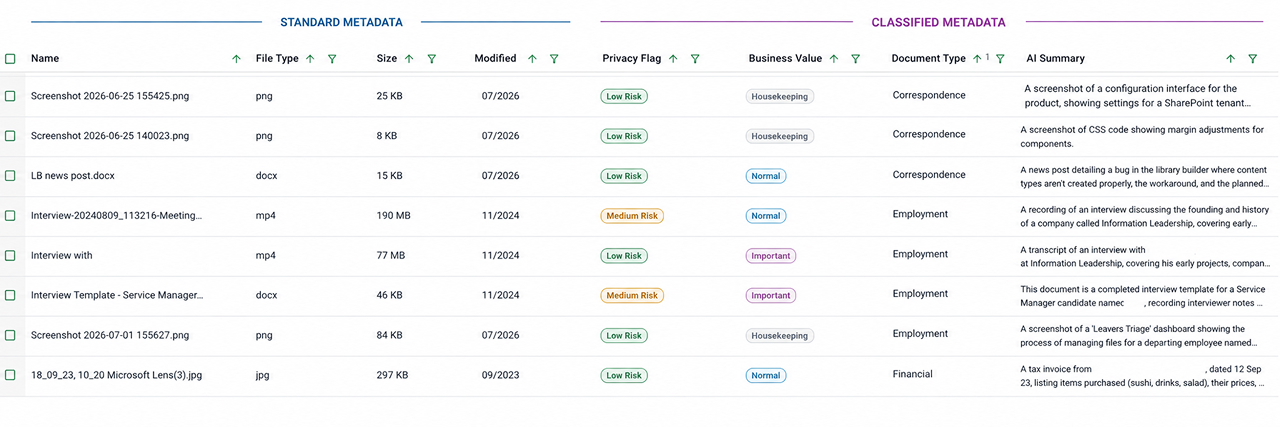
Select any files in the existing grid view. Run the AI autoclassifier. Get metadata back (document type, private information flags, file summary, business value) row by row, column by column. Sort it, filter it, act in bulk.
Keep, delete, move, or migrate to SharePoint. Every action creates a defensible audit trail.
How it works
Select
Choose which files to classify from the existing grid interface.
Classify
AI autoclassifier returns metadata per file: type, private info, summary, importance.
Sort & Filter
Results land in a row-per-file, column-per-metadata view. Sort and filter to your decision set.
Act
Bulk delete, move, copy to SharePoint. Logged. Defensible.
Not just OneDrive.
AI autoclassification runs against files in OneDrive today - and soon it can be run against files held on a legacy fileshare. That makes this particularly powerful for migrations; classify everything in place, decide what stays, what goes, and what moves to a structure SharePoint library.
Now
OneDrive Files
Oct 2026
SharePoint Files
End 2026
FileShare Files
Where it pays off fastest
Five jobs that suddenly got easier

Leavers
Triage a departing employee's OneDrive with AI powered insights. Identify business-critical content, move it to SharePoint, clean up the rest — with an audit trail for every action.

Teams and Workspace Governance
Find personal data at scale. Classify, quarantine, redact, or remove with sign-off built into the workflow.

Storage reduction
Identify the heavy, low-value content driving your storage spend. Act in bulk. See the numbers move.

ROT cleanup
Redundant, obsolete, and trivial content surfaced by classification. Removed by workflow.

Migration to SharePoint
Promote records and working files into a structured library. Leave the rest behind. Classify in place before you move anything. This is where the fileshare support changes the game.
You can run any of these in-house, or have Information Leadership run them as a managed service.
Lorem ipsum dolor sit amet, consectetur adipiscing elit. Suspendisse varius enim in eros elementum tristique. Duis cursus, mi quis viverra ornare, eros dolor interdum nulla, ut commodo diam libero vitae erat. Aenean faucibus nibh et justo cursus id rutrum lorem imperdiet. Nunc ut sem vitae risus tristique posuere.









Free. Fully supported.No change to your licence.
Every existing OneDrive Manager customer receives this release as a free upgrade. No change to your annual licence fee. AI usage is pay-as-you-go, and only kicks in above a generous free allocation.
Free upgrade: same licence fee, same fee structure as today
Free training: live sessions and quick reference guides
Nominated support person: a named contact at IL, not a queue
In-app usage counter
Generic classifiers out of the box: document type, private info, business value
Tuning to your specific taxonomy available as a paid engagement when ready
What happens and when.

July to August 2026 Onwards
Upgrade window opens. Register below and we'll reach out to book your free onboarding session.
Mid September 2026
New features released. Available to all OneDrive Manager customers.
October 2026
Classify and act on SharePoint files
By 2027
Autoclassification extended to FileShare repositories.