
SharePoint
Electronically signed documents will be smart-tagged in SharePoint Online. When a document is uploaded and identified as electronically signed, it will automatically be tagged as ‘Signed’. This enhancement also applies retroactively. Two optional metadata columns will be made available in document libraries:
1. Electronically Signed: Which will indicate whether a document has been signed or not
2. Signature Provider: Displays the service used for the e-signature
This update has begun rolling out now and is expected to be complete before the end of November
AI actions are coming to SharePoint document libraries. Rolling out now, and expecting to be complete before mid-October, ‘AI actions’ will be able to be to be accessed from a button with the same name, in the toolbar. The actions will include generating summaries, comparing files, and generating responses based on prompts.
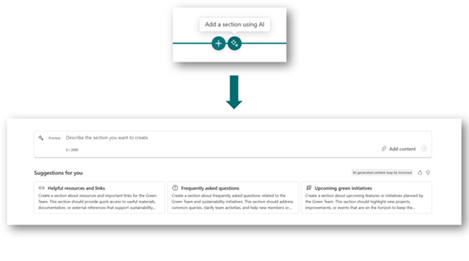
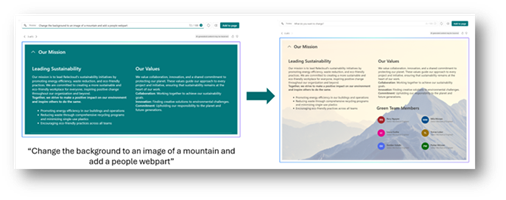
Sections with AI is a SharePoint authoring experience that enables users to generate rich page sections using natural language prompts. This feature is rolling out now and is expected to be complete before mid-November. It will require a Copilot licence.
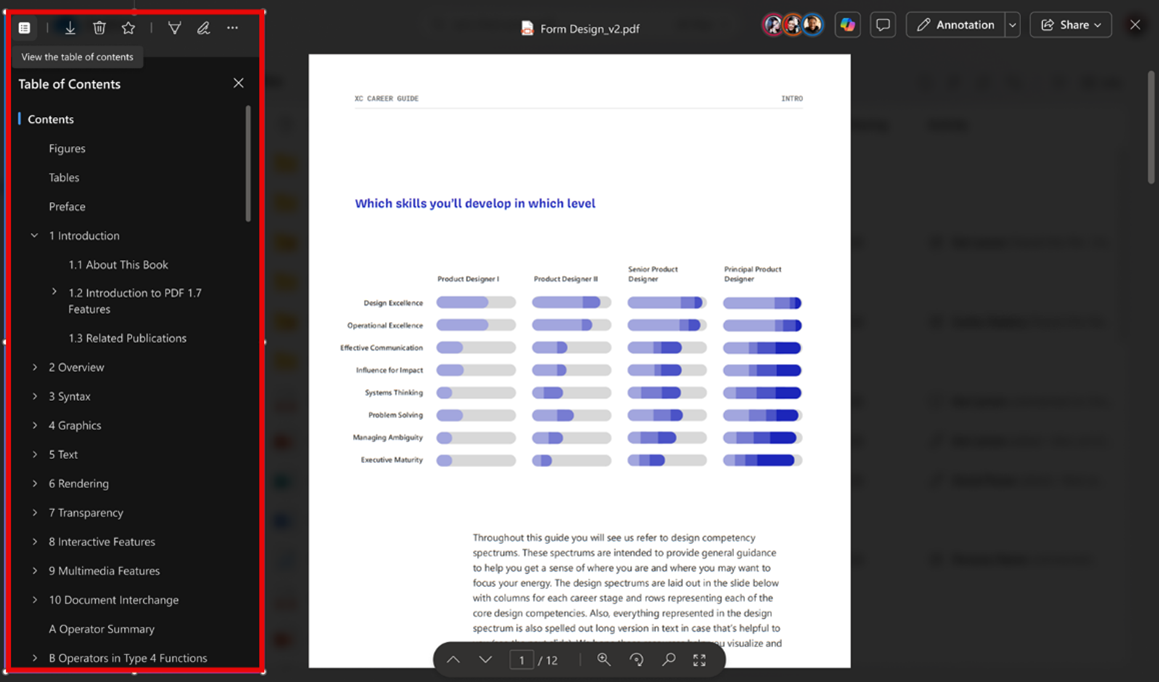
Rolling out now, soon OneDrive and SharePoint will be able to display a table of contents for a PDF. Users will be able to use this table of contents to navigate and jump directly to different areas of the document.
Building SharePoint automations with Workflows is being aligned with the Teams Workflows app experience. The experience will become simplified, helping users streamline tasks like notifications, approvals, and file actions, with only a few clicks. This update is rolling out in mid-October and is expected to be available by mid-November.

The capabilities of document processing rules in SharePoint libraries are being expanded to help site owners and members better manage content. New actions - copy file to, move file to, and set content type to - will be available to all users with edit permissions, enabling more flexible automation based on file metadata. This update has been rolled out now.
Content Management Assessments are being introduced in SharePoint Advanced Management to help admins evaluate site health, permissions, and lifecycle readiness, all from a single dashboard. This feature is off by default and will need to be initiated by an admin. This feature is rolling out now and is expected to be complete in early November.
Access to the Data Access Governance report is being expanded. Previously it was only available via PowerShell but will now be available directly from the SharePoint Admin Centre portal under Reports and Data Access Governance. This enhancement simplifies visibility into site-level permissions across the tenant and supports broader adoption of Microsoft Copilot. This is available now.
Teams
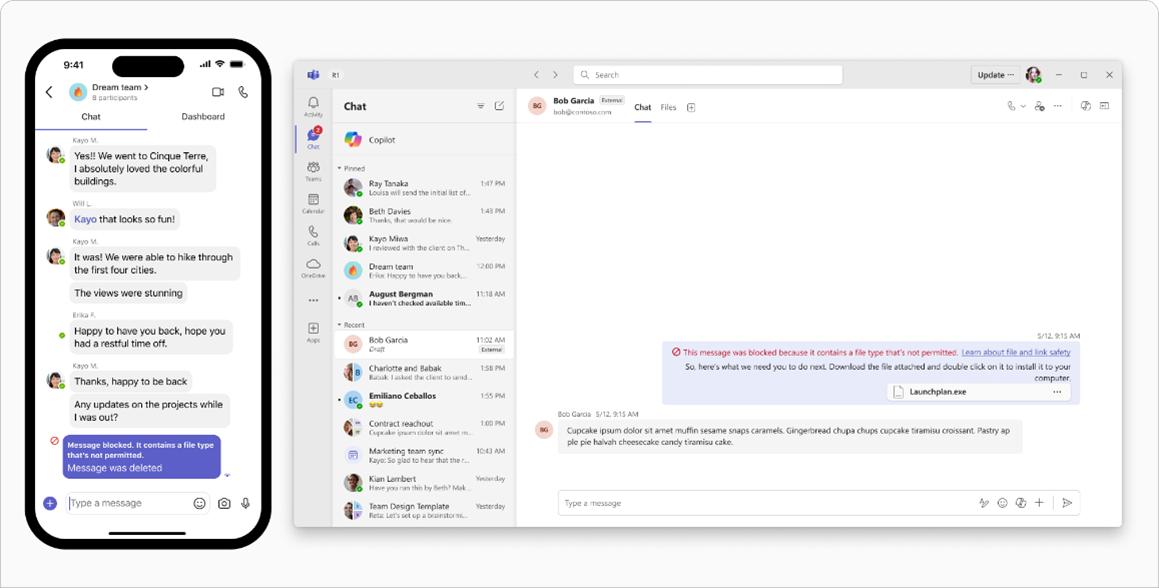
A new protection feature that blocks messages containing weaponised file types (such as executables) is being made available for chats and channels. This will apply to both internal and external conversations. Recipients will see a notification that a message was blocked but will not be able to access the content. Senders will receive a notification and can edit and resend the message without the unsafe file. This feature will be disabled by default but can be enabled under the Teams Admin Centre > Settings and Policies > Messaging Settings > The pill-switch under Messaging Safety. This update is rolling out in early November and is expected to be complete before mid-November.
A new teams premium feature – prevent screen capture – is coming to Teams calls and will allow users to protect sensitive meeting content by blocking screenshots and recordings across supported platforms. This feature will have to be enabled by the meeting organiser. This update is rolling out in October and is expected to be complete before the end of October.
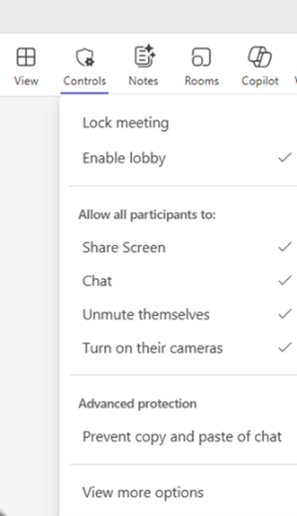
New organiser controls are coming to Teams, for better in-meeting management. A Organiser Controls toolbar will streamline access to important meeting management features. This update is rolling out in early October, and is expected to be complete before the end of October.
Collaborative Notes (powered by Loop) are coming to Teams. This feature will allow users to co-create and edit notes, agendas, and action items directly within the Teams chat interface. This feature can be managed through the Teams Admin Centre and can be disabled at a tenant level. A new ‘Notes’ tab will be made available in group chats, allowing users to create and collaborate on Loop components. This update has begun rolling out now and is expected to be available before the end of October.
Connecting to an office’s Wi-Fi soon will be able to automatically set a user’s work location to reflect the building they are working in. This feature is opt-in and requires configuration. This change will begin rolling out in December and is expected to be complete by mid-December.
Teams will soon have enhanced protection against phishing attacks by detecting and warning users about malicious URLs sharing in Teams chat and channels. This update will begin rolling out in November and is expected to be complete before mid-November. Users will need to enable this feature. Link protection is enforced if at least one participant in the conversation has the feature enabled.
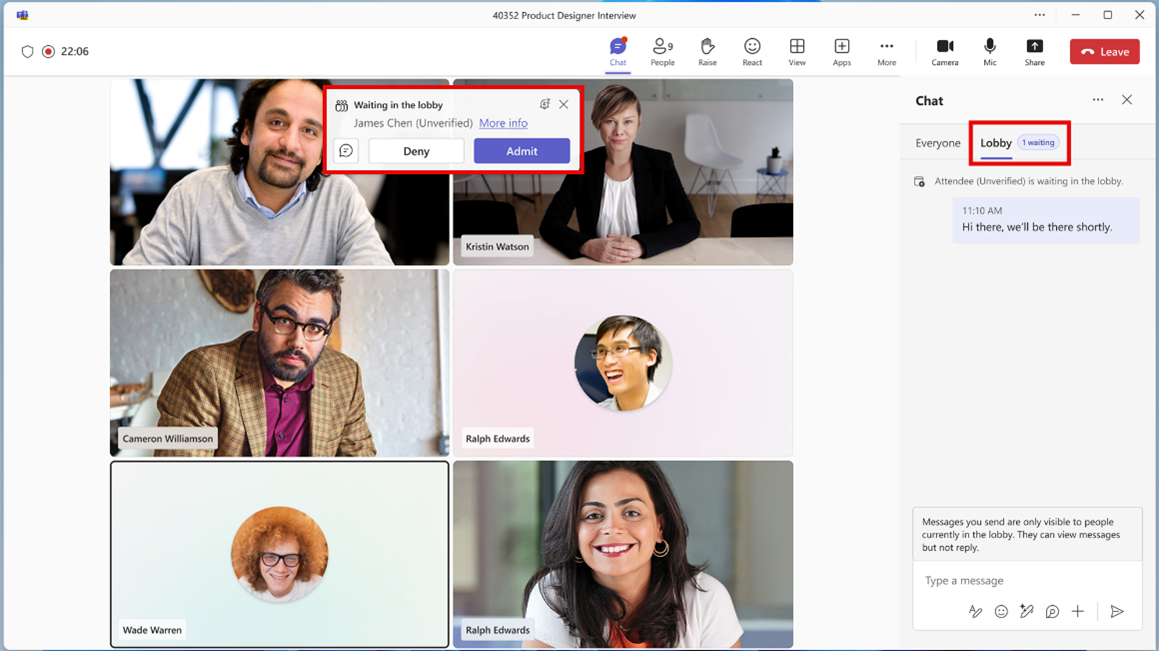
Available now, meeting organisers can send one-way messages to attendees in the meeting lobby using the Lobby chat.
Copilot without transcription will become the default for meetings where Copilot is allowed. Conversation history will also persist during meetings. This change is rolling out in early November, and is expected to be complete before mid-November.
A Copilot On/Off toggle is coming to Teams meetings. Users will be able to select the Copilot icon at the top of the screen when in a Teams meeting, then ‘Turn off for everyone’ from the ellipsis menu. Copilot will not have access to what was said or shown in the meeting while it was turned off. After the meeting ends, Copilot will have access to all chat content and any recordings or transcripts created while it was active.
Planner
More information barriers are coming to Planner, after people raised concerns about a full list of tenant members being viewable when sharing a Plan. Information Barriers will be able to be set up so that only people within a user’s assigned group are discoverable. This update will begin rolling out September 22nd and is expected to be complete on September 30th.
Purview
Microsoft will begin support for the sharing of files protected with Purview sensitivity labels across M365 cloud boundaries. Recipients will be able to view, edit, print, et cetera a document based on the permissions they are assigned to that document, by the owner. This feature is expected to complete rolling out before the end of October.
Two new email indicators are being made available as triggers for data exfiltration detection in Purview. These indicators help identify potential data leaks when users send business-sensitive attachments to personal or public email domains. These indicators can be enabled from the IRM settings page. This feature will begin rolling out in early December and is expected to complete before the end of December.
Admins will soon be able to apply a retention label or policy in OneDrive and SharePoint for files that have not been accessed by anyone in an organisation for a specified period of time. This feature will begin rolling out in mid-December and is expected to complete rolling out before 2026.
Power Platform
As of September 30th, sensitive data fields can be masked with column-level security. This can eliminate the bulk export of these fields and protect personal data.
Copilot
A new library experience is coming to Microsoft 365 Copilot. The library will provide a destination where users can easily access all of their Copilot-generated content – like images and pages. This update is rolling out now and will be available before the end of September.
Realtime voice for Copilot chat is rolling out now. Users will be able to interact with Copilot using their voice, offering a hands-free experience. Users will be able to interrupt or redirect to conversation at any time.
SharePoint agents are coming to Teams channels, allowing users to interact with SharePoint based knowledge through @mentions. This update became available in mid-September.