
Teams
Rolling out in May, soon users will be able to set their preference for how cloud hosted Word, Excel, and PowerPoint files should open when they select links for these files from Teams. This change will extend to links selected in other MS365 apps soon.
Expecting to complete rolling out at the end of next month, a new ‘Tag Mentions’ filter is being added to the Activity feed.
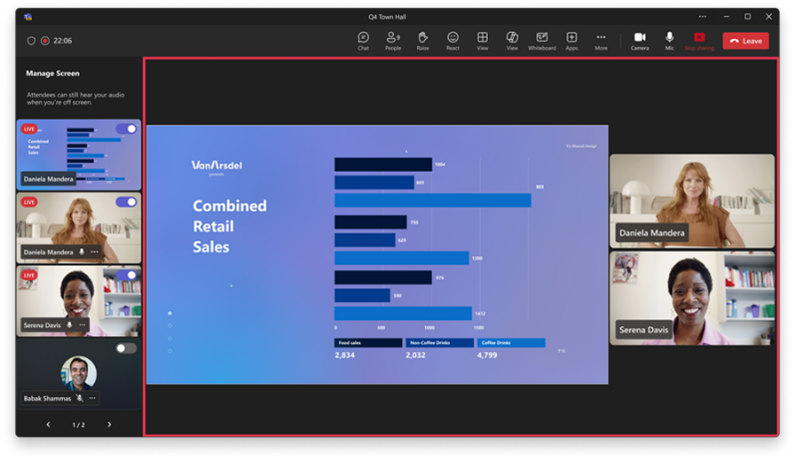
To help deliver better polished meetings and events, Microsoft Teams is gaining a ‘Manage What Attendees See’ feature. Once shared content is brought on screen, the presenter sharing it will now see their content displayed instead of a text message indicating they are sharing. This change is being rolled out in early April, and is expected to be completed in late-April.
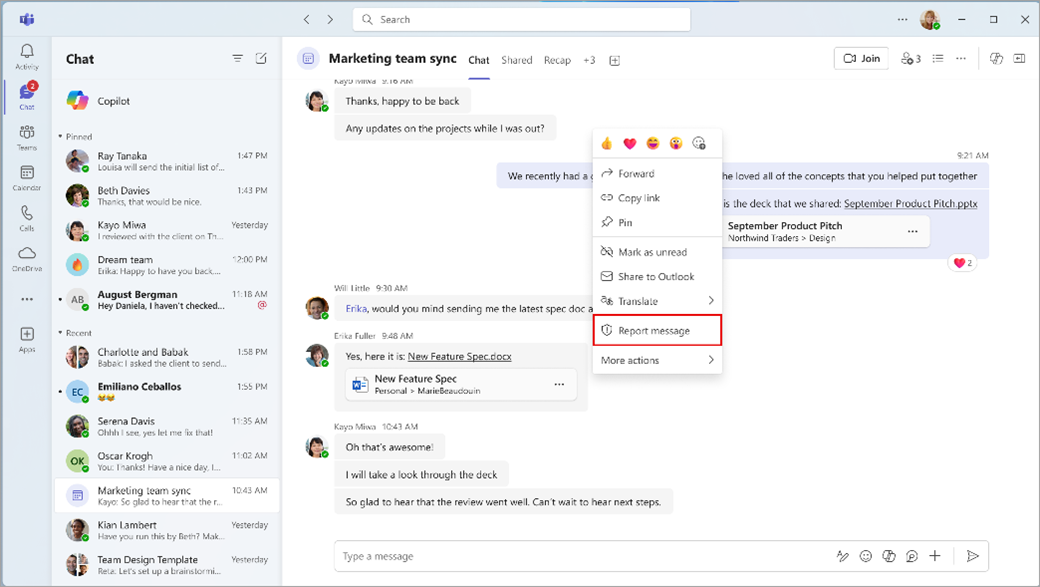
Soon users will be able to easily report security risks and concerns with external users in Teams chats. Users will be able to hover over a chat message, and under the ellipsis menu select ‘Report message’ to report a message-based security concern when chatting or meeting with users outside of their organisation. Admins can turn on this feature in the Teams Admin Centre>Settings and Policies>Global Settings>Messaging Settings>Report a Security Concern. This change will begin rolling out in early May and is expected to be complete before mid-May.
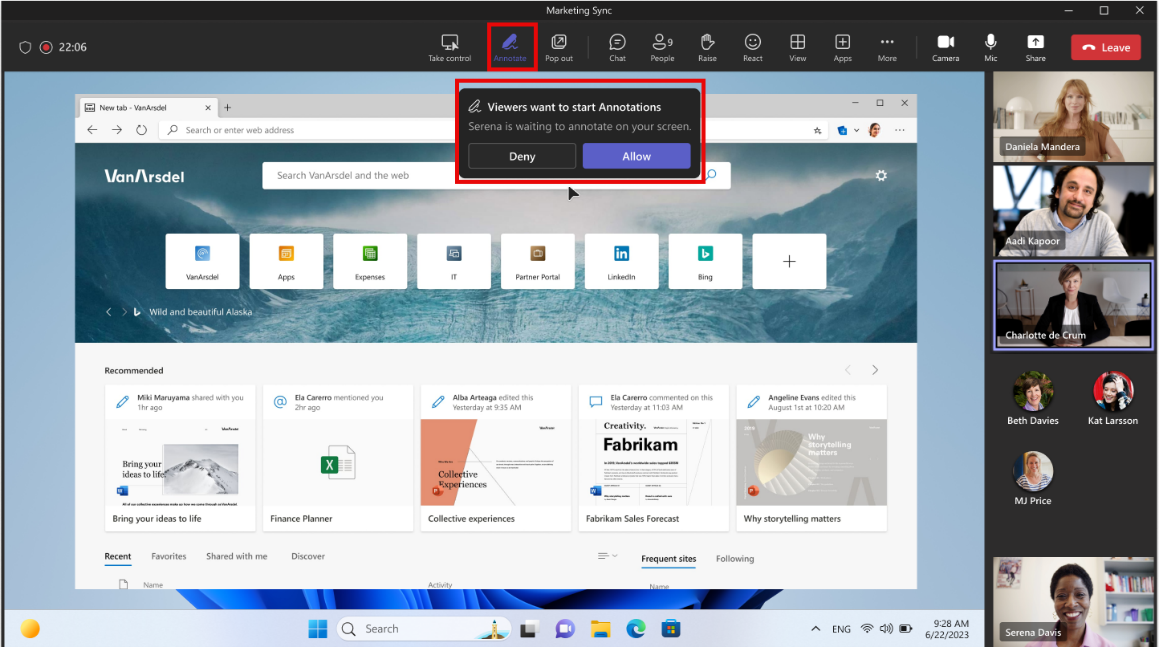
Rolling out in April, soon Teams meeting participants will be able to request an annotation session while someone else is sharing their screen. The request will be sent to the presenter sharing their screen, who can accept or deny it.
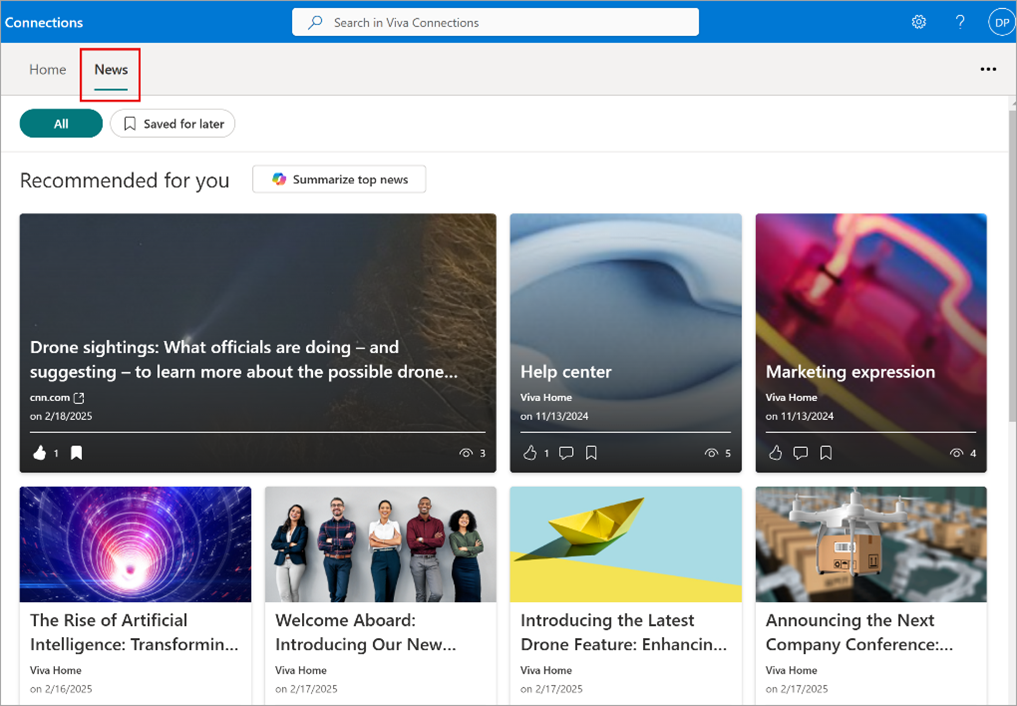
Users will see recommended SharePoint News based on the sites that they follow, sites they frequently access, and what is trending. Boosted news will always be prioritised at the top of the News feed. This change will begin rolling out soon and is expected to be complete by mid-March.
To prevent access issues, Whiteboards created from the Teams Channel Tab App will now be stored in the corresponding SharePoint site of the channel, rather than in the initiator’s OneDrive. This change will begin rolling out in early April, and is expected to be complete before the start of May.
Available now, users are able to record clips in Teams channels, just like they can in chat. The option to record will appear in the compose box under the Actions and apps button for channel posts.
Coming soon, users will be able to reduce the main Teams window size, with no loss of functionality. Teams side panels will also be able to be adjusted. This change has already begun rolling out and is expected to be complete before the end of this month.

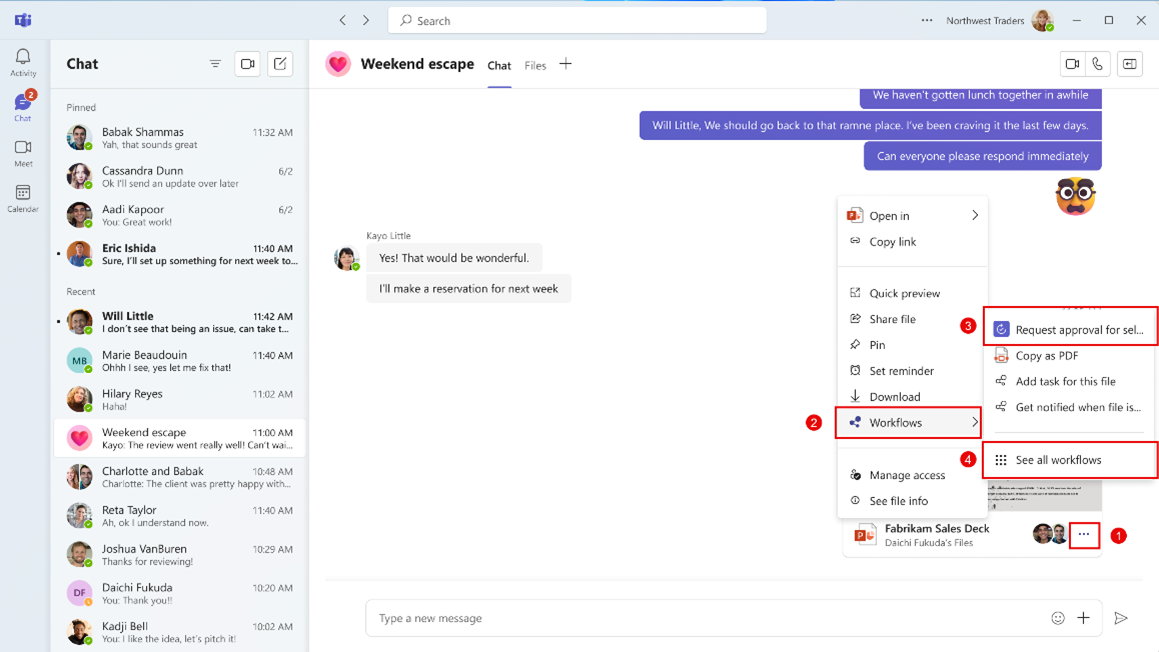
Running and configuring workflows for files in Teams is becoming easier. Under the ellipsis menu for a shared file, users will be able to check ‘Workflows’. From here, users can set up a new workflow, or to run one. This update has begun rolling out now.
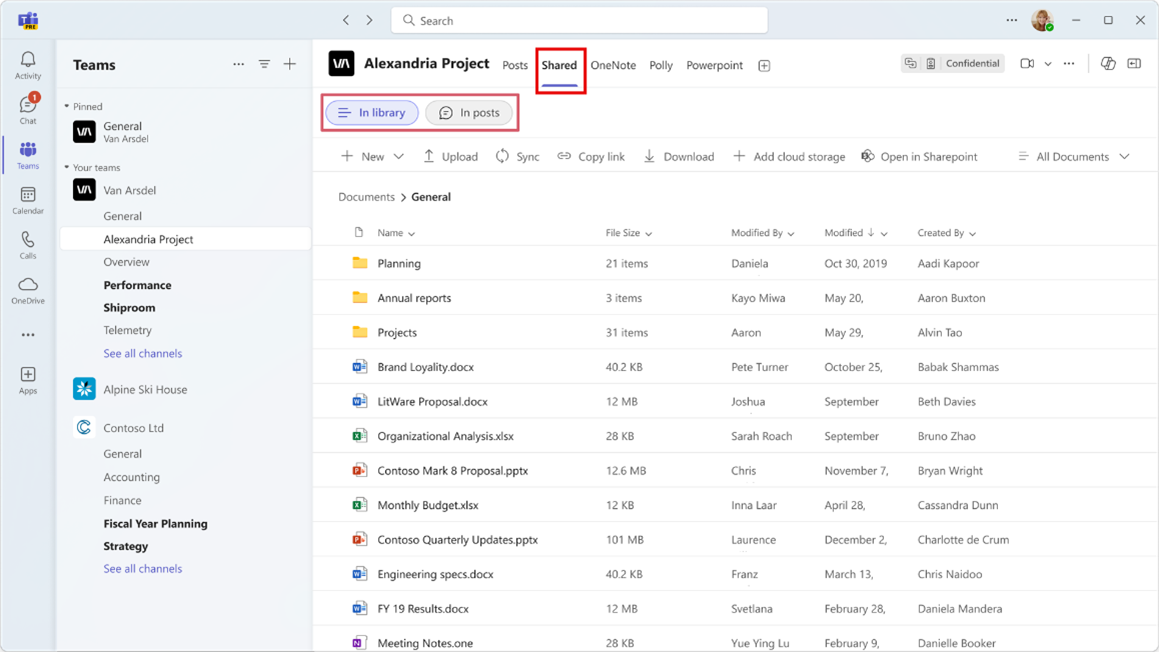
In Teams channels, the ‘Files’ tab is being renamed to the ‘Shared’ tab and will display content shared in posts and content in the document library all in one place. A new view will be added to the tab called ‘In posts’, which will show content from posts. All existing functionality in the Files tab will still be available, in an ‘In library’ view. The ‘Shared’ tab in chats will not be affected. This change will begin rolling out mid-April, and is expected to be complete by mid-June.
Power Platform
Extended use rights with Microsoft 365 apps have expired and may require action. In 2019, Microsoft reclassified a group of Standard Power Platform connectors to premium status. Apps and flows developed with a MS365 subscription before October 1st, 2019, which used these connectors and gateways were given an extended transition period until October 1st, 2024. During this period, both existing and new applications and workflows created within the same tenants were exempt from the premium connector licensing requirement and worked without requiring users to have a premium license. Starting October 1, 2024, these apps and flows require users to have appropriate licenses to remain compliant. In-product enforcement will begin April 1, 2025, requiring you to act now and maintain business continuity. Microsoft recommends that we review our apps and flows to ensure appropriate licenses are assigned before the premium licensing enforcement date of April 1, 2025.
Microsoft are introducing an automated process to delete inactive default environments, starting April. Default environments without premium licenses will be impacted. Admins will receive two notifications prior to the default environment being deleted for inactivity. Any activity within the environment will reset the inactivity period. When an inactive default environment is deleted, a new replacement default environment will be created without Dataverse, with an option to add Dataverse later. Deleted default environments can be recovered within seven days.
SharePoint
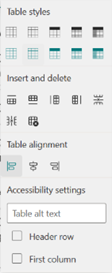
Microsoft are introducing a Table Toolbar, that will allow authors to use table functionalities when editing a site. Previously Table Styles was available via the text webpart, but this has now moved to the Toolbar. Additional features such as split and merge are also being introduced. This update is expected to finish rolling out before the end of this month.

Soon in the Automate menu, users will be able to create customised quick steps for common tasks – such as composing an email, sending an approval request, or starting a Teams chat to specific people. It will be a simple sentence builder experience, similar to SharePoint rules. This change will begin rolling out in early May and is expected to be completed before June.
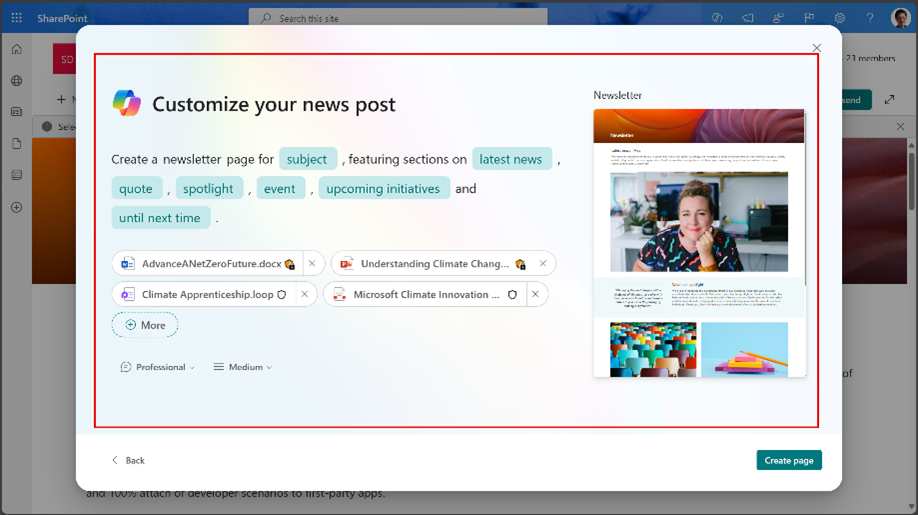
Coming before the end of April, soon Copilot will be able to assist with the creation of pages. Under The ‘+New’ menu, a new ‘Page with Copilot’ option will appear. Copilot will be able to generate high quality page content using LLMs, Microsoft Graph data, templates, and existing documents. Users will be able to use a prompt to create pages based on templates and specify their data sources.
Outlook
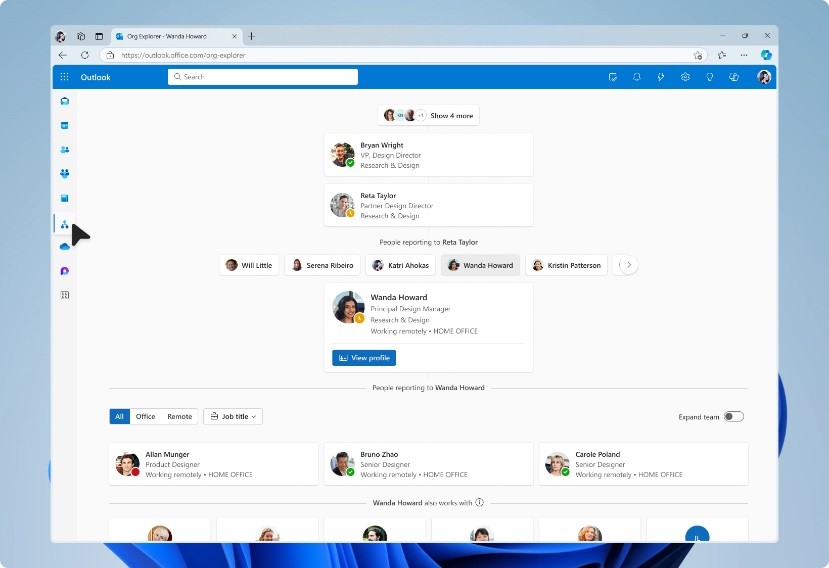
An Organisation Explorer chart is coming to Outlook. The chart will help users visualise their company’s internal structure. This change will begin being rolled out in late May and is expected to be complete before the end of June, but may take longer to appear in classic Outlook.
Microsoft is introducing tenant-level outbound email limits. The limit will restrict the number of external recipients a tenant can send emails to per day. If the limit is exceeded, further messages will be blocked until the volume for the previous twenty-four hours drops below the quota. The quota is calculated based on the number of email licenses a tenant has purchased:
500 * (Purchased Email Licenses^0.7) + 9500
To help admins plan and track their outbound email volume, a new report has been made available in the Exchange Admin Centre. (Reports > Mail Flow > Tenant Outbound External Recipients Rate). The report will show the current volume of external recipients, the daily quota, how much of the quota is used, and if the number of recipients is exceeded: the number of recipients that have been blocked. The report will also how if enforcement for the limit is enabled or disabled.
For example, for tenants who have more than 500 email licenses it will show “Disabled” until March 31st, when Microsoft will start to enable enforcement for tenants who have more than 500 licenses.
This change will roll out in progressive stages:

Microsoft recommends that an admin checks the tenant’s quota and current daily outbound email volume.
Copilot
The Copilot Release Notes page is now available. This page consolidates all Copilot related releases across MS365 into a single, easy to reference resource. It includes filters for Windows, Web, Mac, Android and iOS to display only the most relevant information. The page highlights features that have reached General Availability.
Viva
A new entry point to Viva Connections is being added to the SharePoint app bar. This change is expected to finish rolling out before the end of the month.
OneDrive
To help users more easily identify the source of a OneDrive folder shortcut, new naming logic is coming to folder shortcuts. The site name or the user’s OneDrive will be included in shortcuts. Previously OneDrive shortcuts had the same name as the folder, after this rollout, they will also include the name of the site where the original folder exists, and will even include the name of the owner of the folder, if it has been shared from another user. This change will begin rolling out in mid-March, and is expect to be complete by mid-April.