
What’s changing in Microsoft 365 – and why it matters to you
Microsoft continues to roll out updates across Microsoft 365. Some make everyday work easier. Others have real implications for governance, compliance, and information control. Here’s what matters.
SharePoint & eSignature
More natural document signing – less friction for approvals
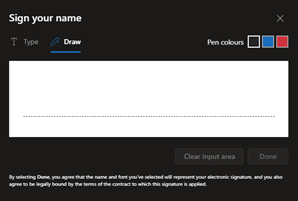
Soon, users will be able to draw their signature directly when signing PDFs using eSignature for Microsoft 365, rather than relying only on typed signatures.
Why this matters
- Signing feels more natural and familiar, especially for external or executive approvals
- Fewer workarounds and less reliance on third party signing tools
- A smoother end to end document experience inside Microsoft 365
When
Rollout begins March
Microsoft Teams – Private Channels
Bigger change, bigger compliance implications
Microsoft is changing how private channels work behind the scenes. Instead of storing data in individual user mailboxes, private channels will now use a shared channel mailbox linked to the team’s Microsoft 365 group.
While we generally don’t recommend private channels, organisations already using them need to pay close attention to this change.
What this enables
- More scalable private channels (up to 1,000 per team)
- Larger membership (up to 5,000 users)
- Meetings can now be scheduled in private channels
What you need to be careful about
- Compliance policies shift from individual users to the team’s group
- Retention, legal hold, DLP, and eDiscovery policies must be reviewed and reapplied
- Policies applied at group level may affect all channels in the team
What good looks like
- Clear guidance on when (and when not) to use private channels
- Group level compliance policies reviewed before migration starts
- Strong information architecture so sensitive content stays controlled
Key dates
- Migration runs until February 2026
- New limits and meeting features follow March 2026
Microsoft Teams – Messaging control
Fewer “oops” messages
Users can now choose what happens when they press Enter while typing a message – send immediately, or start a new line.
Why this matters
- Fewer accidental messages
- Better control for users who draft longer or more sensitive messages
- A small change that reduces everyday friction
When
Rolling out now, completing February
Microsoft Purview & OneNote
Consistent protection for sensitive notes
Sensitivity labels are being extended to OneNote sections, so notes can now be encrypted, access controlled, and governed just like documents and emails.
Why this matters
- Sensitive information doesn’t fall through the cracks
- OneNote becomes safe to use for regulated or high risk content
- Protection travels with the information, wherever it’s accessed
When
Rollout completes by end of February
Microsoft 365 Copilot – Outlook rules
Less inbox noise, without digging through settings
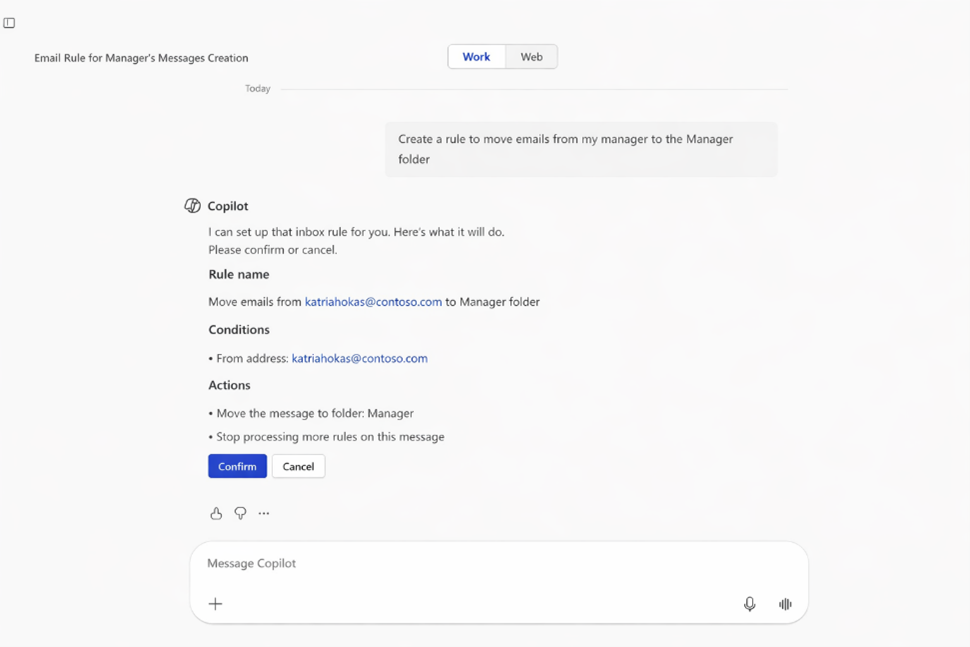
With Copilot, users can now create and view Outlook inbox rules using natural language – simply by asking.
Why this matters
- Faster inbox management
- Less time spent navigating settings
- More value from Copilot in day to day work
A Microsoft 365 Copilot licence is required.
When
Rolling out now, completing early March 2026
Microsoft 365 Copilot – Fewer context switches
Stay focused, even when working with emails and files
Copilot is reducing the need to jump between apps by letting users:
- Open Outlook emails directly inside Copilot chat
- Open Word, Excel, PowerPoint, and PDFs within Copilot
Why this matters
- Better focus and flow
- Faster decision making
- Copilot becomes a true working surface, not just a chat window
When
Rolling out now, completing by end of February
AI transparency – Watermarking generated content
Clear signals when AI is involved
Admins can now turn on visual or audio watermarks for video and audio content generated or altered using AI in Microsoft 365.
Why this matters
- Builds trust and transparency
- Supports ethical and responsible AI use
- Helps organisations meet governance and disclosure expectations
What to know
• Controlled via a Cloud Policy setting
• Applies to AI generated or AI altered media
When
General availability by end of February 2026
Viva Engage in Teams
Broader connection beyond project work
Viva Engage communities are coming directly into Microsoft Teams, making it easier for people to:
- Share ideas across teams
- Learn from leaders
- Join organisation wide conversations, not just project chats
Why this matters
- Stronger culture and knowledge sharing
- Better visibility of leadership communication
- Less reliance on email or fragmented channels
When
Rollout begins April
Viva Engage – Stronger moderation
More control over sensitive conversations
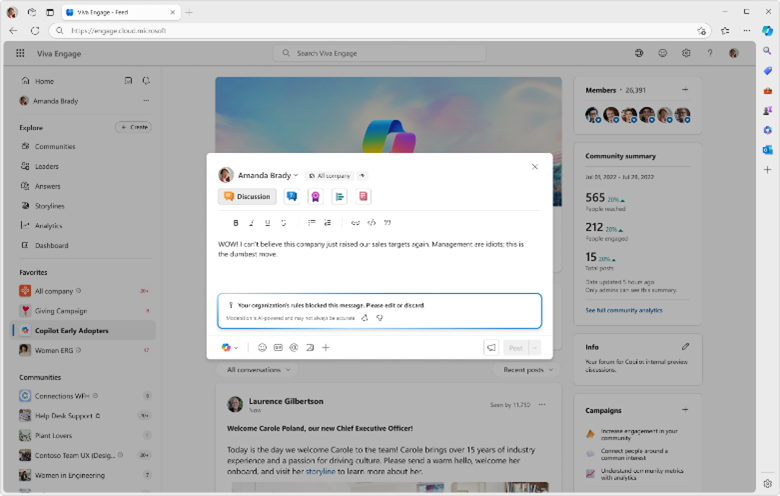
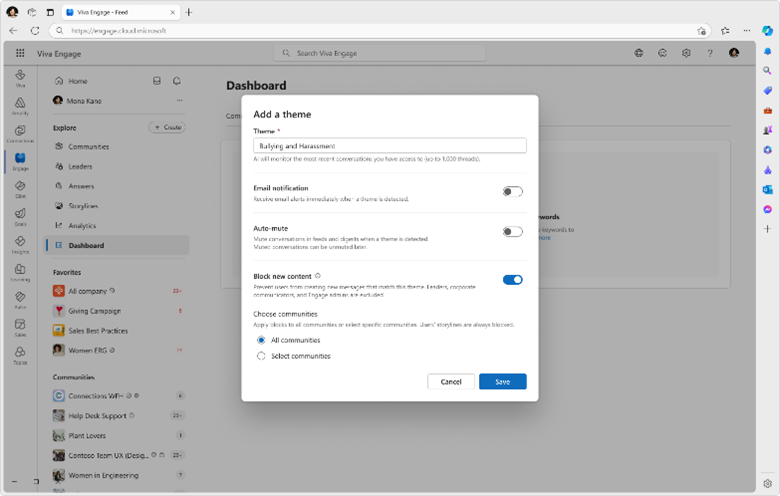
Admins will be able to block posts, comments, or replies based on monitored themes.
Why this matters
- Better control over sensitive or inappropriate topics
- Safer, more intentional employee conversations
- Reduced moderation burden
When
Rolling out this month
Our perspective
These updates continue a clear trend: Microsoft is blurring the line between productivity, compliance, and AI. That’s powerful – but only when your information architecture, governance model, and user guidance are deliberately designed.